July 2, 20269 min read
Free Wedding QR Code Sign Templates (and a Better Alternative)
Where to find free wedding QR code sign templates, how to use one, and the honest catch most couples hit, plus a better all-in-one alternative that just works.
A free template feels like the obvious place to start, and honestly, it is a good one. You want a pretty sign on your tables that invites guests to scan and share their photos, you have a wedding budget stretched in forty directions, and the internet is full of tasteful, ready-made designs you can grab without paying a penny. Download one, drop in your details, print it, done. That instinct is right, and this guide will point you at the best free templates and show you exactly how to use one.
But there is a catch almost every couple hits about halfway through, and it is worth knowing before you spend an evening in design software. A template is only the picture. It does not include a working QR code, and it does not include the page that code needs to point at. This guide covers where to find good free templates, how to use one step by step, the real limitations nobody mentions up front, and the point at which an all-in-one option quietly saves you the whole hassle.
What a QR Code Sign Template Actually Gives You
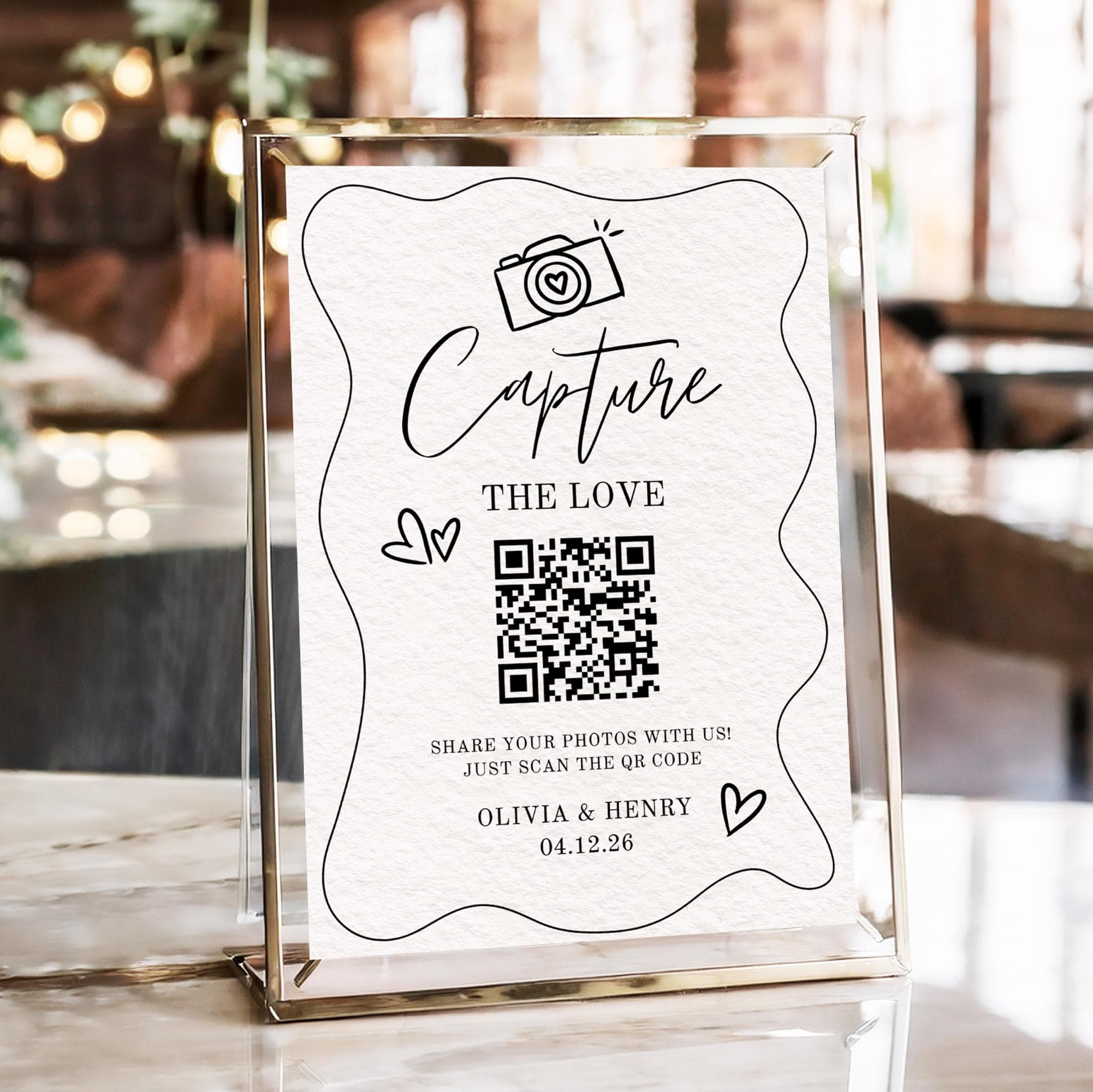
It helps to be clear about what you are actually downloading. A wedding QR code sign template is a design file: a nicely laid-out page with your colours, some elegant fonts, a headline like "Share Your Photos," a little instruction line, and an empty box where a QR code is meant to sit. That is the whole of it. It is the frame, not the picture inside.
What the template does not do is generate a QR code for you, and it certainly does not create anything for that code to link to. The empty box stays empty until you produce your own code and paste an image of it in. And a code is only useful if it points somewhere a guest can actually upload photos. So the template solves the look of the sign, which is the easy and fun part, while quietly leaving the two harder parts to you: making the code, and making sure it leads to a real upload page. Keep that split in mind and the rest of this guide will make sense.
Where to Find Free Wedding QR Code Sign Templates
There are more free and nearly-free options than most couples realise. Here are the ones actually worth your time, with a note on what to expect from each:
- Canva. The best all-round starting point. Search "wedding QR code sign" in the free tier and you get hundreds of editable templates you can recolour, retype, and export in minutes. Just know that the fanciest designs are often marked Pro, and the code box is empty until you add your own.
- Etsy. A huge library of downloadable templates, many under a few dollars and some genuinely free. These tend to be the prettiest and most on-trend designs, usually delivered as an editable Canva link or a Templett file. Lovely results, but you are still generating and dropping in the QR code yourself.
- Google Slides or Google Docs. The quiet DIY winner if you want total control and zero cost. Start a blank page, set it to A5 or A4, add your wording and an image of your code, and export a PDF. Not glamorous, but free forever and easy to reprint if you spot a typo.
- Microsoft Designer or PowerPoint. If you already have Microsoft 365, both give you clean layouts and precise sizing control. PowerPoint in particular is underrated for signage because you can set an exact slide size and export straight to a print-ready PDF.
- Photo-sharing services that include a ready sign. Some services built for gathering wedding photos hand you a finished sign with the QR code already dropped in and already pointing at a working upload page. This is the one route where the template and the code arrive together, which is the whole point of the honest comparison later in this guide.
How to Use a Free Template (Step by Step)
Once you have picked a source, using a template follows the same rhythm wherever it came from. Work through these in order and you will have a print-ready sign in an evening:
- Pick a template that fits your theme. Match the fonts and colours to your invitations and table styling so the sign looks like it belongs, not like it was bolted on at the last minute. A cohesive look is half the reason people bother with a template at all.
- Generate your QR code and drop it in. This is the part the template leaves to you. Create a code that points at a real photo upload page, save it as a crisp PNG or SVG, and place it in the empty box. If you have not made one yet, our guide to how to make a QR code for wedding photos walks through it end to end.
- Add one clear line of wording. Resist the urge to explain everything. A single warm instruction such as "Scan to share your photos from today" beats a paragraph. Guests decide in a second whether to bother.
- Size it for where it will stand. Use A5 for table cards people hold up close, and A3 or larger for a welcome sign read from across the room. The bigger the viewing distance, the bigger the code needs to be.
- Export as a PDF or high-resolution PNG. A PDF keeps text crisp and prints reliably at any size. Avoid low-resolution exports, which turn a QR code soft, and soft codes do not scan.
- Print on card stock and test a scan. Print at the real final size, then scan it with your own phone and upload a test photo. This last step catches nearly every problem before it reaches your tables.

The Catch With Free Templates
Free templates are genuinely useful, and for some couples they are exactly right. But it is only fair to lay out the limitations honestly, because they are the reason so many couples start with a template and then wish they had known this sooner:
- The template does not include a working QR code. You still have to generate one yourself, and it has to point at a page that will still be live on your wedding day and afterwards. The prettiest sign in the world does nothing if the code box is empty or the link is dead.
- Free QR generators often make static codes you cannot change. Many free tools bake the destination permanently into the pattern. If that link ever breaks or you need to redirect it, the printed code is dead and you are reprinting every sign.
- There is no live slideshow or gallery behind it. A template is a static picture. It cannot show photos flowing in during the reception, and it does not give you a place where all the uploads gather. You would have to build and host that separately.
- Design software has a learning curve. Recolouring, resizing, aligning a code, and exporting cleanly is fiddly if you do not do it often. An evening you meant to spend once can turn into three.
- You manage the hosting and downloads yourself. Where the photos land, who can reach them, whether the page stays online, and how you eventually download everything in full resolution all become your job. That is the quiet cost that does not show up until later.
The Better Alternative: An All-in-One Setup
This is where a dedicated photo-sharing service earns its place, and it is worth being straight about why. Instead of stitching together a free template, a separately generated code, and a page you host yourself, an all-in-one service does the whole chain for you. It generates the QR code, hosts the upload page that code points to, and collects every photo as a full-resolution original rather than a squashed copy. Guests upload straight from the browser with no app to install, everything gathers in one gallery that never expires, and you download the lot with a single click when you are ready. Many services, including ours, also hand you a ready-to-print sign with the code already dropped in, so the template and the code come together and simply work. Some even run a live slideshow so photos appear on a screen at the reception as guests send them. For the full lay of the land on the code side, read the complete QR code wedding photos guide, and to see how fast the setup really is, how to set up wedding photo sharing in 5 minutes walks through it.
Free Template vs All-in-One: A Quick Comparison
| Feature | Free template + free QR | All-in-one service |
|---|---|---|
| Cost | Free, or a few dollars | One flat fee, free to start |
| Working upload page | You build and host it | Included and hosted for you |
| Code can change later | Usually no, static codes | Yes, managed for you |
| Live slideshow | No | Yes |
| Full-resolution originals | Depends on your setup | Yes, kept as originals |
| Time to set up | An evening or more | Minutes |
Which Should You Choose?
Here is the honest answer, because not everyone needs the paid route. If your budget is tight, you enjoy a bit of DIY, and you already have a reliable place for photos to land, a free template plus a carefully made code will do the job nicely, and you should feel good about saving the money. If, on the other hand, you would rather it simply work, with the code, the sign, the upload page, and the gallery all handled and guaranteed to hold up on the day, an all-in-one setup is worth the small cost for the peace of mind alone. Neither choice is wrong. It comes down to how you would rather spend the hours between now and the wedding.
Whichever way you lean, the sign itself is the easy part, and a good free template will make it look lovely. Just remember that the design is only the frame. The thing that turns a pretty card into a flood of candid photos you keep forever is a working code pointing at a real upload page. Get that right, by hand or all in one, and your guests will do the rest without a second thought.
Frequently asked questions
Where can I get a free wedding QR code sign template?
Canva is the best all-round starting point, with hundreds of free editable designs. Etsy has beautiful downloadable templates, some free and most only a few dollars, while Google Slides or PowerPoint let you build your own at no cost. Remember that every one of these gives you the design only, so you still add your own QR code.
How do I make a QR code for a wedding sign?
Generate a code that points at a photo upload page, save it as a crisp PNG or SVG, and drop it into the empty box on your template. The most important detail is where it links: it must open an upload page in the browser, not an app store or a gallery. Our guide to how to make a QR code for wedding photos covers the whole process.
Are free QR code generators safe for weddings?
Reputable free generators are safe to use, but the risk is not safety so much as reliability. Many free tools create static codes with the link baked in permanently, so if that link ever breaks the code cannot be fixed without reprinting. For a wedding, a code you can update later is the safer choice.
Do free QR codes expire?
The code pattern itself does not expire, but the page it points to can. If you use a free generator with a static code and the destination page goes offline, the code effectively dies. Dedicated services use codes that can be redirected and gather photos in a gallery that never expires, which sidesteps the problem entirely.
What size should a wedding QR code sign be?
Use A5 for table cards guests hold up close and A3 or larger for a welcome sign read from across the room. As a rule the code itself should be at least 3cm by 3cm, and bigger for anything viewed from a distance. Keep a clear margin of white space around the code so phones lock on quickly.
Skip the template fiddling
Create your event and get a QR code plus a ready-to-print sign in minutes, linked to a real upload page. No design software needed.